
How to purchase
State CME is included in the Premium Plan, or can be purchased on its own. For more information, please click here.
How to access
Prerequisite: You must be a Premium subscriber or have purchased the individual State CME plan.
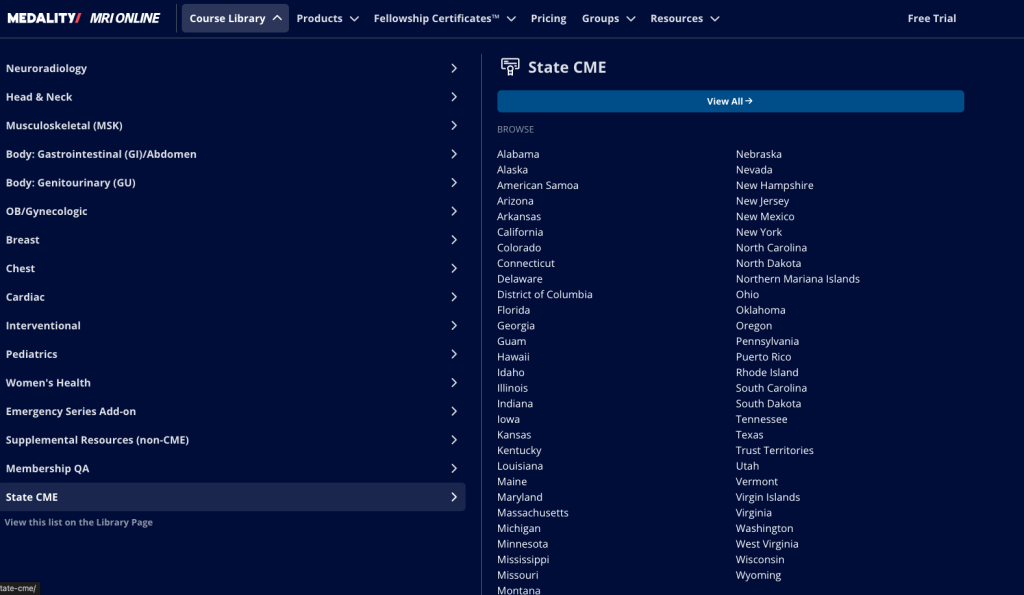
To access State CME, go to Course Library > State CME and select the course you are interested in (or select View All).
Where can I find / claim my State CME certificates on Medality.com
To claim your State CME certificates, follow the steps below.
- Go to https://medality.com/home/.
- Click your profile icon in the top right corner of the page and select “CME Certificates.”
- Select the “Premiere” tab.
- Choose the certificate(s) you would like to download.
- Review your selections and click “Download Selected.”
- The certificates will download to your device and can be found in your Downloads folder.
Is Medality the accreditor for courses offered by Premier Education?
No. The accrediting organization for Premiere Education is PACE. If learners or customers have questions about CME earned from a premierece.com course, they should contact Premiere Education directly.
Reporting CME to states
Through Premiere, your CME may be automatically reported to eligible state boards if those boards participate in CE Broker integration.
CE Broker works with a number of state boards in partnership with Premiere. You can review their list to determine which boards apply to you.
For reporting CME to other states, please coordinate with your practice administrator. If you’d prefer, you can also share their contact information with us and we’ll be happy to work with them directly.